How data flows in a Vue application.
Started from the bottom 😫
Every software developer knows that looking back on old code will always be cringey. From what we "thought" was the best way to do something, to how we attempted to maintain some kind of structure with what we were doing. The way we interacted with data in our Vue apps is one of those moments where looking back at it, it was, quite honestly, a 💩 show. Fetching small chunks of data throughout various nested components, making feeble attempts at maintaining their state cohesively, attempting to pass that data up and down the chain... it just was not pretty.
Say we wanted to create a simple app that displays animals, and we want to implement the section on dogs. A simple setup the "old" way could look something like this.
// routes.js
...
  {
    path: 'animals',
    component: Animals
  },
  {
    path: 'animals/dogs',
    component: Dogs
  }
  {
    path: 'animals/dogs/:id',
    component: Dog
  }
<!-- animals.vue -->
<template>
  <!-- ... cute fuzzy animals ... -->
  <template>
    <script>
      ...
      mounted () {
        this.animals = this.$store.dispatch('fetchAnimals')
      }
      ...
    </script></template
  ></template
>
<!-- dogs.vue -->
<template>
  <!-- ... lots of doggos ... -->
  <template>
    <script>
      ...
      mounted () {
        this.dogs = this.$store.dispatch('fetchDogs')
      }
      ...
    </script></template
  ></template
>
<!-- dog-details.vue -->
<template>
  <!-- ... Luna details ... -->
</template>

<script>
  ...
  mounted () {
    this.dog = this.$store.dispatch('fetchDog', { id }
  }
  ...
</script>
Ultimately, this nests the store calls for getting the data about dogs into the components themselves. If we want to add user input to the component, maybe allow someone to add notes about the animal, add pictures, or write comments, it would turn into a mess trying to manage the data. Events would be firing off to store that user-inputted data, we'd be trying to figure out where to specifically place those events so the data stays in sync where it's needed... just an overall messy structure that is difficult to maintain. The views and components are now getting bothered by the integration and data-focused code instead of being a visual representation of the data.
Keeping the FE separate from the BE, we don't always know what will change on the BE. We may want to add or remove an item, but that could mean recalculating values on the view or in the JS. We'd THINK that we need to know the business logic or how to replicate that on the FE, but that's just doing the same work that the BE is already doing.
Take this example from our very own Signet repo:
  SET_PAYMENT_VERIFICATION(state, { id, contractId, verification }) {
    if (state.paymentDetails[id]) state.paymentDetails[id].payment_verification = verification
    if (state.recentPayments[contractId]) {
      const index = state.recentPayments[contractId].findIndex((p) => p.id === id)
      if (state.recentPayments[contractId][index])
        state.recentPayments[contractId][index].payment_verification = verification
    }
  }
Just to update that payment verification, instead of a simple refetch to update it across the app, we set it in the state.paymentDetails, but then also have to dive into state.recentPayments, check if it's in there, and manually set it there as well to keep the data in sync. This is not scalable or maintainable. We're manually updating the store via mutations whenever it is needed, and convoluting those beyond their initial intention.
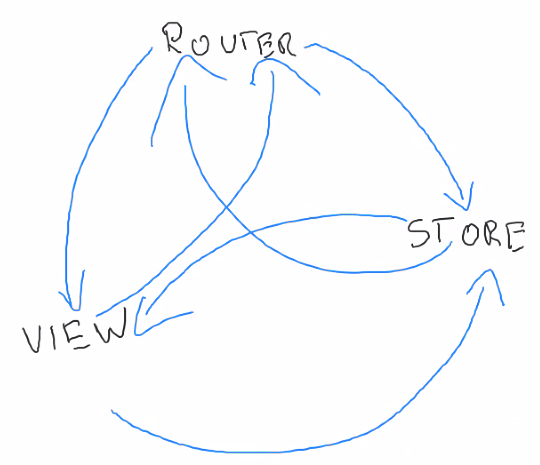
This omnidirectional data flow is depicted in this beautiful drawing done by the one and only Maciej Gibas! 🧑🎨
Now we're (almost) here 🧐
Imagine a world where we can pull all the data we need in just one area of the code. I know it's not hard for y'all since half the team started when we were already attempting to do this, but to a developer coming back from their "finding myself" two-year-long trip in the woods, they'd be amazed.
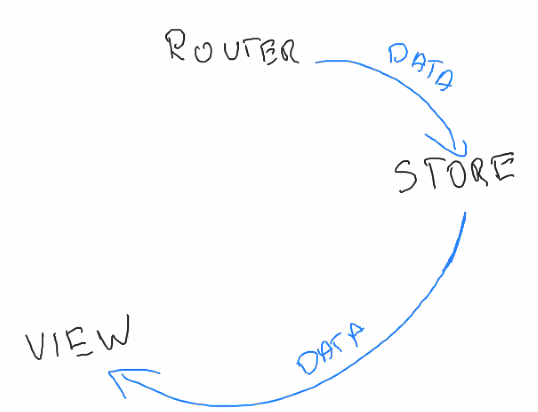
Enter in the key player named routes.js, which gets hit first every time a user goes to any of the app's pages. This begins the process of unidirectional data flow where we fetch the data in the router, set it in the store, and display it in the view. The URL they go to identifies the specific resource they're trying to hit, so it makes sense that the router is the best place to fetch that resource and its data. The router is also already selecting the appropriate view/component to display that resource, so now this whole process is in one place, making it way easier to manage.
// routes.js
...
  {
    path: 'animals',
    component: Animals,
    beforeEnter: () => {
      store.dispatch('fetchAnimals')
      next()
    }
  },
  {
    path: 'animals/dogs',
    component: Dogs,
    beforeEnter: () => {
      store.dispatch('fetchDogs')
      next()
    }
  }
  {
    path: 'animals/dogs/:id',
    component: Dog,
    beforeEnter: (to) => {
      store.dispatch('fetchDog', { id: to.params.id })
      next()
    }
  }
This takes out all those pieces of data fetching scattered across components and neatly keeps it all in one place. Then in each component, you'd do something like this:
computed: {
  ...mapState({ animals: state => state.animals })
}
And THEN, in the wonderful world of Vue 3... it would be a wee bit cleaner:
const animals = computed(() => store.state.animals)
This ultimately is doing what the end goal is - unidirectional data flow! The Vue reactivity system takes care of that fetched data once it arrives by updating the dom, which means we don't need to wait for the data. We can start rendering a view concurrently while Vue takes care of the rest.
And now we're (really) here! 🥹
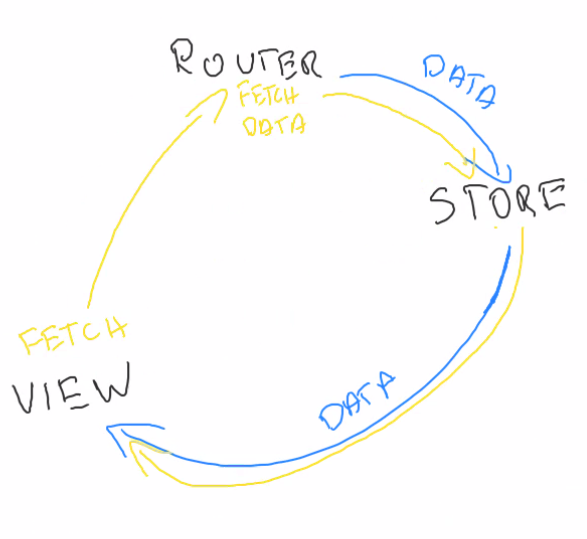
The Frontendies couldn't stop there apparently, because things get even slicker - causeway-vue-fetch-data. This has the three main pieces - fetchData(), useData(), and fetch(). These three functions are what maintains the data flow in our modern apps to be unidirectional - from the router, to the store, and then to the component.
fetchData() is used in the router to get our data initially.
// routes.js
...
  {
    path: 'animals',
    component: Animals,
    meta: {
      fetchData: () => {
        store.dispatch('fetchAnimals')
      }
    }
  },
  {
    path: 'animals/dogs',
    component: Dogs,
    meta: {
      fetchData: () => {
        store.dispatch('fetchDogs')
      }
    }
  }
  {
    path: 'animals/dogs/:id',
    component: Dog,
    meta: {
      fetchData: (to) => {
        store.dispatch('fetchDog', { id: to.params.id })
      }
    }
  }
useData() is used in the component to return the collection of data.
const { data: animals } = useData(router, { model: () => store.state.animals })
fetch() is used in the component to refetch the data, which refreshes it in the store, and then the view will reflect any changes from it.
const { fetch } = useData(...)

function refresh() {
  fetch()
}
And now... our final diagram where the blue path is the initial path of data flow, and then the yellow path is for the calls after that. 🎉
Recap 🧢
Initially, the way data was flowing was omnidirectional - essentially bouncing between the router, view and store in no particular order. This led to confusing code, difficulty scaling as components are added, data not being refreshed properly, and overall just felt messy.
The way data is flowing and updating now is cyclical and unidirectional - starting at the router, then store, then view, rinse and repeat. It's understandable, easier to scale, maintainable, and just... clean. With the addition of causeway-vue-fetch-data beyond that, we now have a structured way of handling this across our apps as well.
Happy coding, y'all! 👩💻👨💻
← Back to blog